Context
It’s been a while since I wanted to remove the facebook app from my phone! Currently I use facebook for mainly two things:
- Messenger: To interact with friends who don’t want to move to Signal…
- Birthday reminders: To remind me of everyone’s birthday
Since messenger has a dedicated app I realized that I could start by getting rid of the facebook app if I was able to find an alternative for birthday reminders.
Since I like to automate things (and reinvent the wheel because, I am sure, this service already exists) I wondered: What if I built a bot which would be in charge of sending me an email everyday to tell me whose birthday it is.
Enter 1337, the friendly Birthday Bot :tada:
In order to build it, I just needed to:
- Retrieve the birthdays of my friends and relatives
- Identify if there are birthdays today by scanning the data and selecting the rows matching the current date
- If there is at least one birthday then send myself an email with the name of the person(s)
- Automate this process to run once everyday

Approach
Step 1 - Retrieve the bithdays
The first step was to retrieve my friends’ birthday dates from facebook.
It seems that a while ago facebook provided their users with the ability to export all their friends birth dates to a CSV or calendar events. They’ve since removed this feature probably because they realized that birthday reminders was a functionality that retained a portion of their user base.
Long story short you cannot do that anymore and I didn’t want to write a scraper to do it because there was a much easier alternative. There is a small chrome/brave extension that you can install which retrieves them for you:
Click here for the extension
Using the extension to retrieve the birthdates was a pretty straightforward process. You just need to connect to your facebook account and follow the steps detailed by the extension. At the end, you are provided with the option to export the information retrieved as a CSV or as calendar objects. I opted for the CSV format because I wanted my bot to parse it and notify me by email everyday if it is anyone’s birthday.
Step 2 - Parse the CSV
The CSV data retrieved was dead simple. It had 5 columns and was saved in a dedicated file birthdays.csv in my bot directory:
- Name
- Year
- Month
- Day
- Link to Profile
Name,Year,Month,Day,Link to Profile
John Doe,1984,12,1,https://facebook.com/some_facebook_user_id
Maria Doe,1984,1,15,https://facebook.com/some_facebook_user_id
...
Ruby is excellent for data manipulation and has a dedicated CSV module with a very simple API which makes it very easy to parse CSV data. Thus, I created a birthday_robot file inside the /bin directory which would contain the logic for parsing the data and triggering the email sending:
#!/usr/bin/env ruby

require 'csv'
require 'date'

all_birthdays = CSV.read("birthdays.csv", headers: true)
current_date = Date.today
birthdays = all_birthdays.select do |birthday|
  current_date.month == birthday["Month"].to_i && current_date.day == birthday["Day"].to_i
end

if birthdays.any?
  # Send email
end
There are 3 small things worth noting in the above code:
-
We use
CSV.readwhich works fine in our case because the file size is small and has a small number of rows. But imagine you had 10M friends !!!
If it were the case then usingCSV.readand storing the result in a variable would be a bad idea because it would mean building the entire CSV object in memory…

A much better alternative would be to use theforeachmethod provided by theCSVmodule because it would be way less memory intensive as it would iterate on the file line by line. -
Same thing goes for the
selectmethod call that I’ve used. It is really simple and worked well for our use case because there are so few rows in the file. However, it is worth noting that we could easily improve the performance here because the rows retrieved are ordered by month and day. This implies that we could just check the values up until theMonthfield is superior to the current month and stop afterwards. -
The data type of the parsed CSV values is
string. So we need to callto_ion theMonthandDayfields to convert them to theintegerformat which is needed in order for us to be able to perform a comparison with the data types returned when callingcurrent_date.monthorcurrent_date.day. Otherwise we are returned anArgumentErrorwhich makes total sense:
ArgumentError: comparison of Integer with String failed
In other terms, an optimized version of the above code which would work much better for a large CSV dataset would look like this:
#!/usr/bin/env ruby

require 'csv'
require 'date'

current_date = Date.today
birthdays = []
CSV.foreach("birthdays.csv", headers: true) do |row|
  break if current_date.month < row["Month"].to_i # This relies on the hypothesis that the rows are ordered in ascending order by Month/Day

  if current_date.month == row["Month"].to_i && current_date.day == row["Day"].to_i
    birthdays << row
  end
end

if birthdays.any?
  # Send email
end
Step 3 - Send email
There starts the interesting part. I had never sent emails from ruby directly before. I had used Rails’ ActionMailer and its associated abstractions but I wanted to use the SMTP module included in ruby’s standard library which provides a lower level interface which seemed pretty interesting.
The doc was quite clear and I started with a basic implementation which worked well in my local environment.
#!/usr/bin/env ruby

require 'net/smtp'
...
if birthdays.any?
  names = birthdays.map { |bday| bday["Name"] }.join(" and ")
  message = <<~MESSAGE
  From: Birthday Bot <#{BIRTHDAY_BOT_EMAIL_ADDRESS}>
  To: #{TARGET_EMAIL_ADDRESS}
  Subject: Birthday Reminder
  Date: #{Date.today.strftime('%a %d %b %Y')}
  Greetings !
  I am 1337, the Birthday Bot 🤖
  I wanted to remind you that today is #{names}'s birthday !
  Don't forget to send them a nice message
  MESSAGE

  Net::SMTP.start(
    'smtp.gmail.com',
    25,
    'mail.from.domain',
    BIRTHDAY_BOT_EMAIL_ADDRESS,
    BIRTHDAY_BOT_EMAIL_ADDRESS_PASSWORD,
    :login
  ) do |smtp|
    smtp.send_message message,
                      BIRTHDAY_BOT_EMAIL_ADDRESS,
                      TARGET_EMAIL_ADDRESS
  end
end
Apparently there are two ways to proceed. You can either:
- Explicitly create an
SMTPinstance and start a connection. Then send your message and manually callfinishto close theSMTPsession:
smtp = Net::SMTP.start('your.smtp.server', 25)
smtp.send_message msgstr, 'from@address', 'to@address'
smtp.finish
- Or, opt for the version I chose above where I use the result of the
startmethod onNet::SMTPwhich apparently instantiate anSMTPobject and yields it in the block which allows us to call thesend_messageinstance method afterward. The main advantage of this approach is that it closes theSMTPsession automatically when the block ends. No need to callfinishonsmtp.
Everything was fine in my local environment. The email were successfully sent. So I thought that everything was fine and decided to push my code to Heroku -> git push heroku main
Once deployed I opened an Heroku console and tried to run my command:
heroku run bash
$ birthday_bot
And then… :boom:
SMTPAuthenticationError: ..., 'Must issue a STARTTLS command first')
Mmh … Interesting. I googled the issue a dozen of times, tried several different solutions but did not find much useful information…
One of the most upvoted solution suggested to use a port different from port 25 which is the one used in the ruby documentation because apparently it is an open relay which means that it is unauthenticated and that it was used for spamming which would explain why Gmail would not want me to use it.
Well, I tried to change the port to 587 which was the one recommended and the one most commonly seen in the ActionMailer config I’ve seen posted to StackOverflow. Unfortunately this did not work…

I looked at the documentation again and tried to find a solution from there by looking at anything related to TLS. After a few minutes of research I’ve found the enable_starttls_auto command which sounded like it could solve my problems :tada:
I amended my code just slightly to make sure to call the enable_starttls_auto method on my smtp object before trying to send the message:
...
Net::SMTP.start(
    'smtp.gmail.com',
    587,
    'mail.from.domain',
    BIRTHDAY_BOT_EMAIL_ADDRESS,
    BIRTHDAY_BOT_EMAIL_ADDRESS_PASSWORD,
    :login
  ) do |smtp|
    smtp.enable_starttls_auto # Added here to hopefully solve the issue
    smtp.send_message message,
                      BIRTHDAY_BOT_EMAIL_ADDRESS,
                      TARGET_EMAIL_ADDRESS
  end
But, again, it was not working

I then remembered that when I began I chose to use one syntax over another to start the SMTP connection.
Remember, when I used Net::SMTP.start(something, something).{ |smtp| ... } instead of explicitly instantiating an SMTP object, explicitly starting and explicitly finishing the connection ?
Well, I tried changing that:
...
smtp = Net::SMTP.new('smtp.gmail.com', 587)
smtp.enable_starttls_auto
smtp.start('mail.from.domain', BIRTHDAY_BOT_EMAIL_ADDRESS, BIRTHDAY_BOT_EMAIL_ADDRESS_PASSWORD, :login)
smtp.send_message message,
                  BIRTHDAY_BOT_EMAIL_ADDRESS,
                  TARGET_EMAIL
smtp.finish
And guess what it freaking worked !!! I guess that enable_starttls_auto needed to be called on the instance before the start method.

Step 4 - Automate the daily check
Finally, the last thing I needed to handle was how I would be able to make sure that the script would run everyday without having to trigger it manually. My code was hosted on Heroku and I started looking at solutions involving cron tables when I came across this article about the scheduler add-on for Heroku.
With very little config I could make sure that my script would run everyday at a given time. By running these 2 small commands:
heroku addons:create scheduler:standard
heroku addons:open scheduler
It then opened Heroku’s web interface and I have been able to set the frequency of execution of my birthday_bot command by just filling out the form.
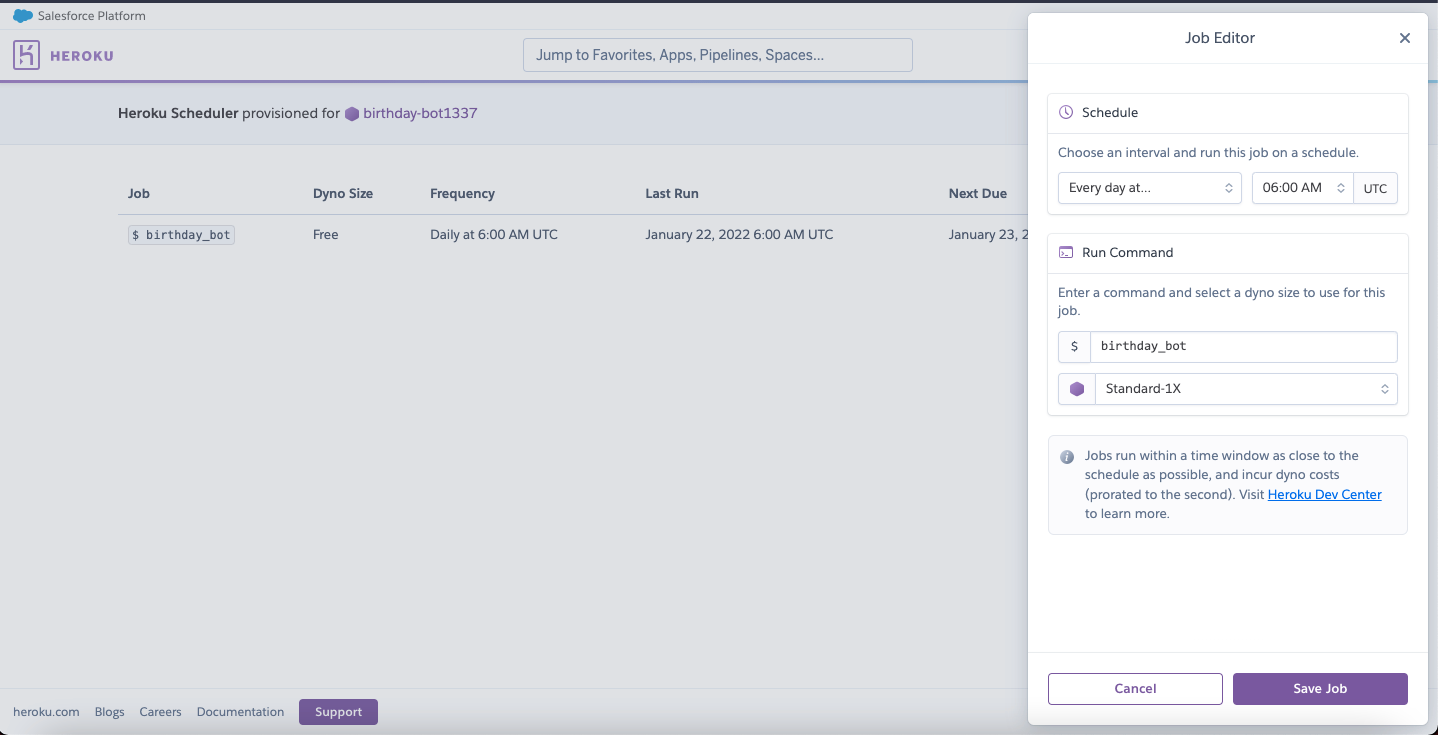
I decided to have it run everyday early in the morning so that I would wake up with an email from my bot telling me whose birthday it is.